 BOZKURT CODE
Your whole local dev stack in one self-contained app Tüm yerel geliştirme ortamın tek, kendi kendine yeten bir uygulamada
Runtimes, databases, a web server, local DNS and trusted HTTPS, all in one folder. No Homebrew, apt, choco, Docker or VM. To uninstall, delete the app and that folder. Çalışma ortamları, veritabanları, web sunucusu, yerel DNS ve güvenilir HTTPS; hepsi tek bir klasörde. Homebrew, apt, choco, Docker veya sanal makine yok. Kaldırmak için uygulamayı ve o klasörü silmen yeterli.
PHP · Node.js · Bun · Python · Go · Caddy · MariaDB · PostgreSQL · Redis/Valkey · Mailpit
Desktop, terminal, AI agent or phone: same daemonMasaüstü, terminal, yapay zekâ ajanı ya da telefon: aynı daemon
Every client talks to the local daemon bozkurtd over one documented HTTP API, so anything you can do in one, you can do in the others.Her istemci, belgelenmiş tek bir HTTP API üzerinden yerel daemon bozkurtd ile konuşur. Birinde yapabildiğin her şeyi diğerlerinde de yapabilirsin.
Desktop appMasaüstü uygulaması
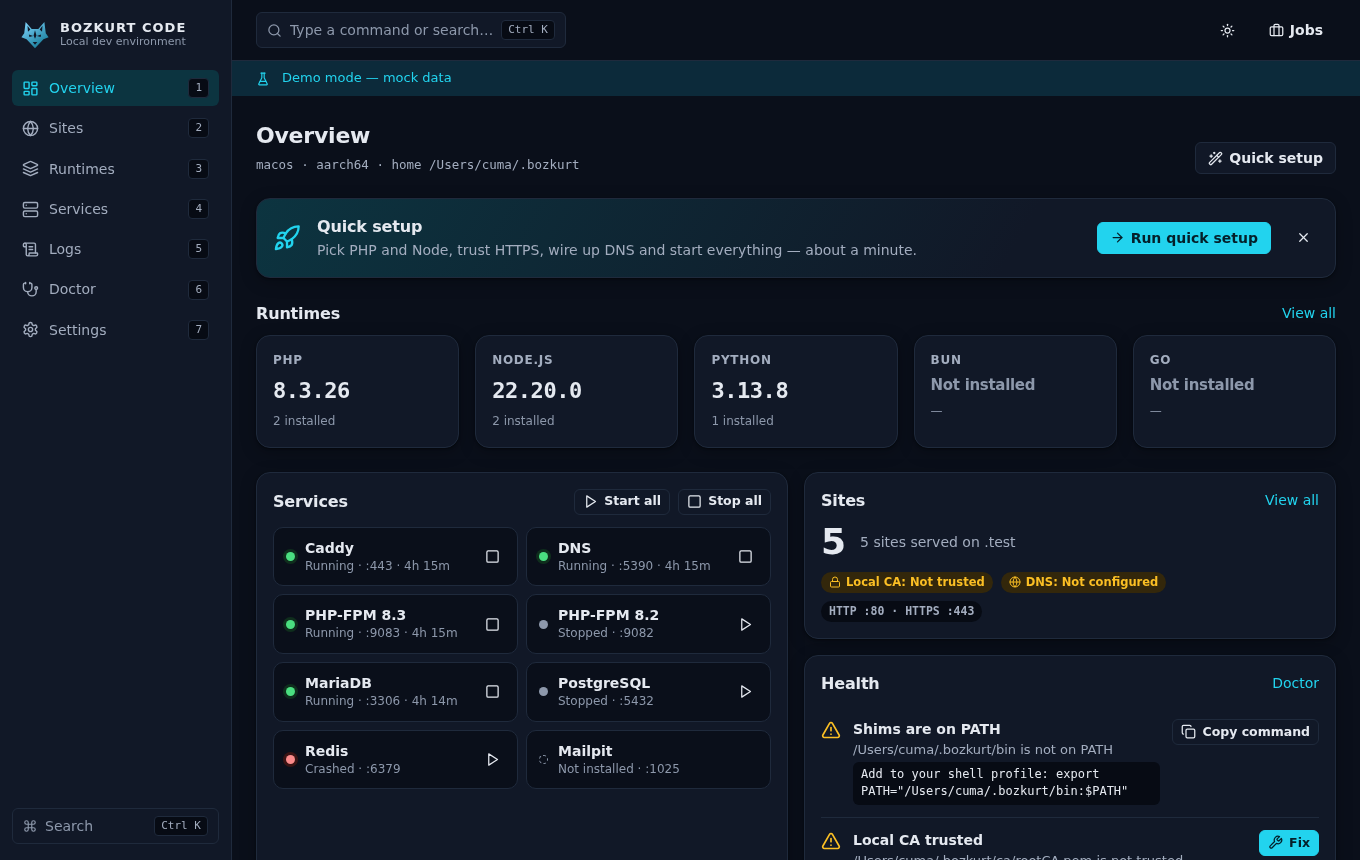
Tray menu, command palette (⌘K / Ctrl K), light/dark themes, English and Turkish UI.Tepsi menüsü, komut paleti (⌘K / Ctrl K), açık/koyu tema, İngilizce ve Türkçe arayüz.
bz CLIbz komut satırı
Every daemon feature from the terminal, with JSON output, documented exit codes and daemon autostart.Daemon'un tüm özellikleri terminalden; JSON çıktı, belgelenmiş çıkış kodları ve otomatik daemon başlatma.
bozkurt-mcp
Let Claude Code, Cursor, VS Code, Windsurf, Gemini CLI or Codex manage your stack, with safety tiers.Claude Code, Cursor, VS Code, Windsurf, Gemini CLI veya Codex ortamını güvenlik katmanlarıyla yönetsin.
Mobile companionMobil yardımcı
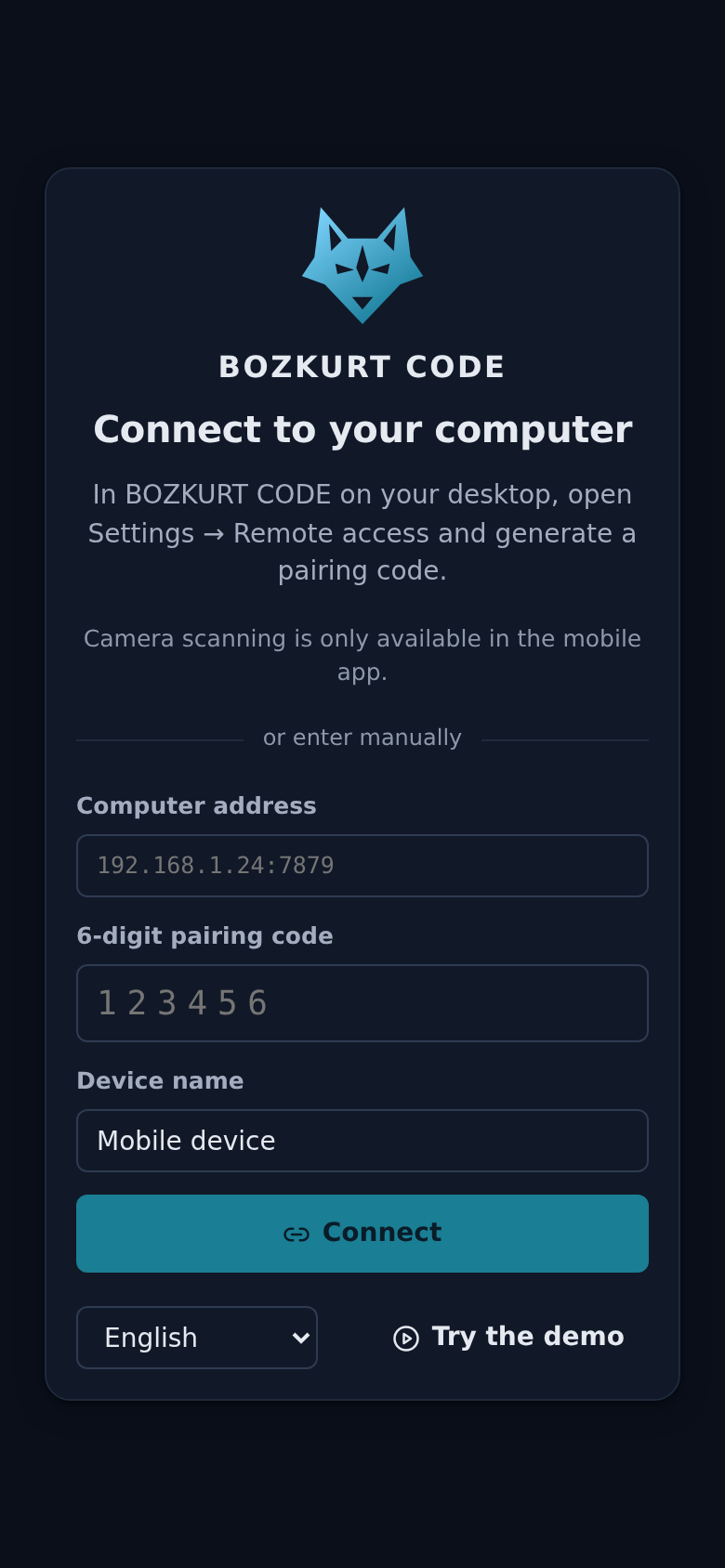
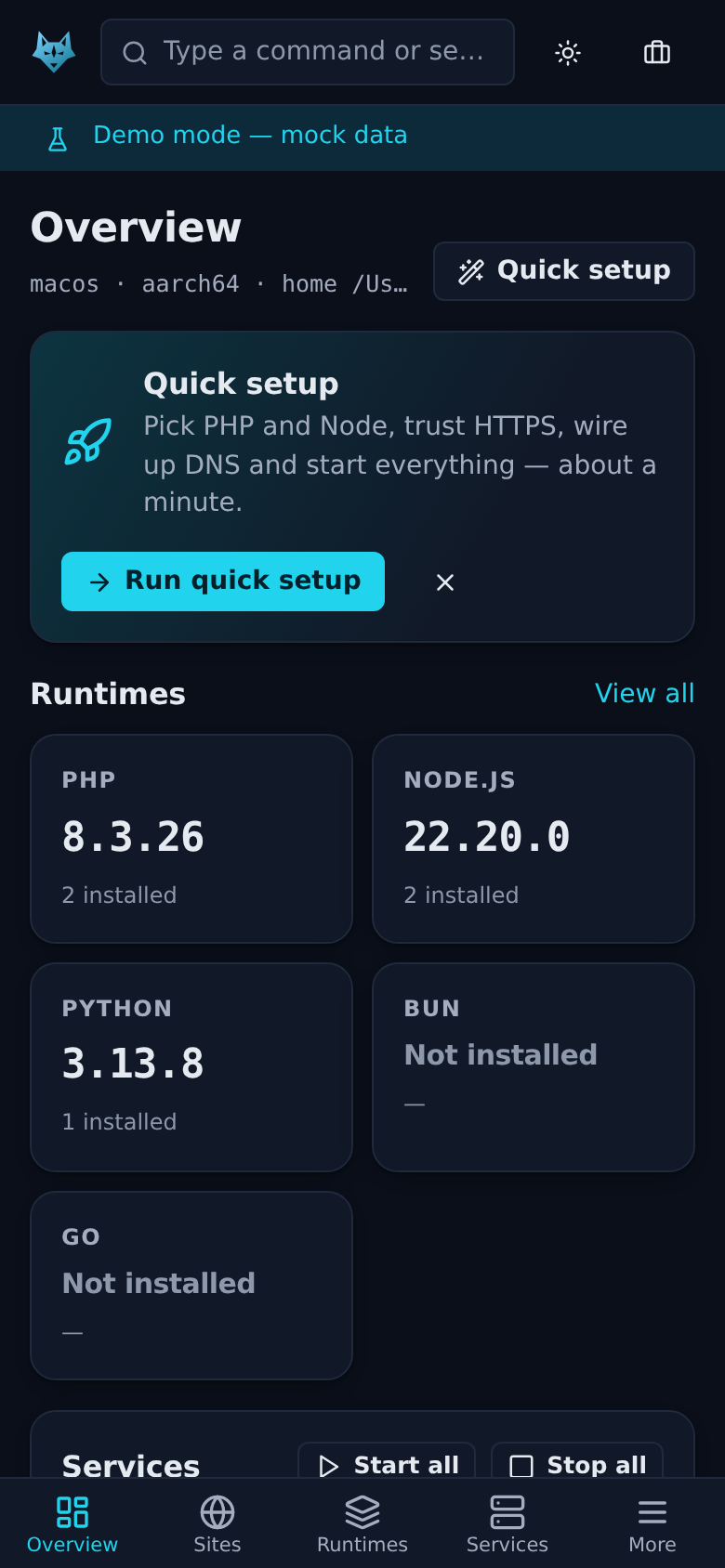
Pair over the LAN with a QR code, then start services, manage sites and follow logs from your phone.QR kodla yerel ağda eşleş; servisleri başlat, siteleri yönet ve günlükleri telefondan izle.
Everything a web project needs locallyBir web projesinin yerelde ihtiyaç duyduğu her şey
Every binary, runtime, database, certificate and log lives under ~/.bozkurt (%LOCALAPPDATA%\Bozkurt on Windows). Anything written outside it is backed up first.Her ikili dosya, çalışma ortamı, veritabanı, sertifika ve günlük ~/.bozkurt altında durur (Windows'ta %LOCALAPPDATA%\Bozkurt). Dışarıya yazılan her şeyin önce yedeği alınır.
Per-site runtime versionsSiteye özel sürümler
PHP 8.0+, every Node.js LTS/current, Bun, Python and Go. Versions are read from composer.json, .nvmrc, .python-version, go.mod and more. Switching is atomic.PHP 8.0+, tüm Node.js LTS/güncel sürümleri, Bun, Python ve Go. Sürümler composer.json, .nvmrc, .python-version, go.mod gibi dosyalardan okunur. Geçiş atomiktir.
Zero-config detectionSıfır yapılandırmayla algılama
Laravel, Symfony, WordPress (Bedrock), Drupal, Next.js, Nuxt, Astro, SvelteKit, Remix, Vite, Express, Django, Flask, FastAPI, Go and static sites.Laravel, Symfony, WordPress (Bedrock), Drupal, Next.js, Nuxt, Astro, SvelteKit, Remix, Vite, Express, Django, Flask, FastAPI, Go ve statik siteler.
Caddy front proxyCaddy ön vekil sunucusu
PHP-FPM pools, reverse proxy to a port, static files, or app sites where BOZKURT runs your dev command and assigns $PORT. Wildcards and aliases included.PHP-FPM havuzları, bir porta ters vekil, statik dosyalar ya da geliştirme komutunu BOZKURT'un çalıştırıp $PORT atadığı uygulama siteleri. Joker alt alan adları ve takma adlar dahil.
Supervised servicesDenetlenen servisler
MariaDB, PostgreSQL, Redis (Valkey) and Mailpit with install, start/stop, autostart, logs and crash restart with backoff. An existing server on the port is used as external.MariaDB, PostgreSQL, Redis (Valkey) ve Mailpit: kurulum, başlat/durdur, otomatik başlatma, günlükler ve çökmede kademeli yeniden başlatma. Portta zaten çalışan bir sunucu external olarak kullanılır.
HTTPS without mkcertmkcert olmadan HTTPS
Its own local CA, trusted in your user store (login keychain, CurrentUser\Root, NSS). Per-site leaf certificates are issued and renewed automatically.Kendi yerel CA'sı, kullanıcı deposunda güvenilir (login keychain, CurrentUser\Root, NSS). Siteye özel sertifikalar otomatik üretilir ve yenilenir.
Local DNS for *.test*.test için yerel DNS
A built-in responder plus native OS routing: /etc/resolver, systemd-resolved / NetworkManager, or NRPT. The hosts file is the fallback.Yerleşik bir DNS yanıtlayıcı ve işletim sistemine özgü yönlendirme: /etc/resolver, systemd-resolved / NetworkManager veya NRPT. Yedek yöntem hosts dosyasıdır.
Doctor with fixesDüzeltme öneren Doctor
bz doctor checks ports, DNS, trust, PATH and permissions, names the process holding a busy port and suggests a fix for each problem.bz doctor portları, DNS'i, güveni, PATH'i ve izinleri denetler; meşgul portu tutan süreci adıyla gösterir ve her sorun için bir çözüm önerir.
Import from other toolsDiğer araçlardan içe aktarma
Scans Valet, Herd, MAMP, XAMPP, Laragon and Homebrew vhosts and imports the ones you confirm, with backups.Valet, Herd, MAMP, XAMPP, Laragon ve Homebrew sanal sunucularını tarar, onayladıklarını yedek alarak içe aktarır.
Share a public URLHerkese açık URL ile paylaş
bz share shop.test opens a temporary public URL through cloudflared, downloaded on demand. Ctrl-C stops sharing.bz share shop.test, gerektiğinde indirilen cloudflared ile geçici bir genel URL açar. Ctrl-C paylaşımı durdurur.
A tour of the desktop appMasaüstü uygulamasında kısa bir tur
Overview: runtimes, services, sites and health at a glance.
Your stack, from the couchOrtamın, koltuğundan
Phones cannot host PHP-FPM or MySQL, but they can control the computer that does. Enable remote access in Settings, scan the QR code, enter the 8-digit code, and you get a bearer token for the LAN listener. Remote access is off by default.Telefonlar PHP-FPM veya MySQL çalıştıramaz ama bunları çalıştıran bilgisayarı yönetebilir. Ayarlar'dan uzaktan erişimi aç, QR kodu tara, 8 haneli kodu gir; yerel ağ dinleyicisi için bir erişim anahtarı alırsın. Uzaktan erişim varsayılan olarak kapalıdır.
From zero to https://shop.test in six commandsAltı komutla sıfırdan https://shop.test'e
Admin rights are needed only for OS DNS routing and, optionally, system-store trust. Each is one named step you confirm. Everything else runs as your user. The desktop app does the same through Overview → Quick setup.Yönetici izni yalnızca işletim sistemi DNS yönlendirmesi ve isteğe bağlı olarak sistem deposuna güven için gerekir. Her biri onayladığın, adı belli tek bir adımdır. Geri kalan her şey senin kullanıcınla çalışır. Masaüstü uygulaması aynısını Genel bakış → Hızlı kurulum ile yapar.
$ bz doctor              # ports, DNS, trust, PATH
$ bz dns setup           # route *.test (admin prompt)
$ bz trust               # trust the local CA
$ bz php install 8.3     # or: bz node install 22
$ bz link --https
$ bz open                # → https://shop.test
Desktop app or CLI onlyMasaüstü uygulaması ya da yalnızca CLI
The desktop app bundles bozkurtd, bz and bozkurt-mcp. Every release ships SHA256SUMS and GitHub build-provenance attestations.Masaüstü uygulaması bozkurtd, bz ve bozkurt-mcp'yi içinde getirir. Her sürümde SHA256SUMS ve GitHub derleme kaynağı doğrulamaları bulunur.
macOS
- Apple Silicon / Intel
.dmg
curl -fsSL https://raw.githubusercontent.com/cumabozkurt/bozkurt-code/main/scripts/install.sh | shLinux
- x64 / arm64 · glibc ≥ 2.35
.deb·.rpm·.AppImage
curl -fsSL https://raw.githubusercontent.com/cumabozkurt/bozkurt-code/main/scripts/install.sh | shWindows
- x64 (ARM via emulation)(ARM emülasyonla)
.msi·-setup.exe
irm https://raw.githubusercontent.com/cumabozkurt/bozkurt-code/main/scripts/install.ps1 | iexAll downloads on GitHub ReleasesTüm indirmeler GitHub Releases'ta
Note: builds are code-signed only when signing certificates are configured. An unsigned build may trigger Gatekeeper or SmartScreen warnings. The CLI installers need no root/admin and write only to $BOZKURT_HOME/bin.Not: derlemeler yalnızca imzalama sertifikaları tanımlıysa imzalanır. İmzasız bir derleme Gatekeeper veya SmartScreen uyarısı verebilir. CLI kurulum betikleri root/yönetici gerektirmez ve yalnızca $BOZKURT_HOME/bin klasörüne yazar.
Platform support in 1.01.0'da platform desteği
| macOS | Linux x64 | Linux arm64 | Windows x64 | |
|---|---|---|---|---|
| Desktop app, CLI, MCPMasaüstü, CLI, MCP | ✓ | ✓ | ✓ | ✓ |
| PHP · Node.js · Bun · Python · Go | ✓ | ✓ | ✓ | ✓ |
| Caddy · PostgreSQL · Mailpit | ✓ | ✓ | ✓ | ✓ |
| Bundled MariaDBPaketli MariaDB | external | ✓ | external | ✓ |
| Bundled Redis (Valkey)Paketli Redis (Valkey) | external | ✓ | ✓ | external |
external: run your own server on the default port and BOZKURT detects and uses it.external: varsayılan portta kendi sunucunu çalıştır; BOZKURT onu algılar ve kullanır.
55 MCP tools with safety tiersGüvenlik katmanlı 55 MCP aracı
bozkurt-mcp is a stdio MCP server. Destructive and system-level tools return a preview until they are called with confirm: true. bz mcp register <client> writes the config for you.bozkurt-mcp bir stdio MCP sunucusudur. Yıkıcı ve sistem düzeyindeki araçlar confirm: true ile çağrılana kadar yalnızca önizleme döndürür. bz mcp register <istemci> yapılandırmayı senin için yazar.
$BOZKURT_HOME.Geri alınabilir, $BOZKURT_HOME içinde.confirm: true.confirm: true olana dek önizleme.# one command: $ bz mcp register cursor # or by hand: { "mcpServers": { "bozkurt": { "command": "bozkurt-mcp" } } } # Claude Code: $ claude mcp add --scope user bozkurt -- bozkurt-mcp
Local-first, locked down by defaultÖnce yerel, varsayılan olarak kilitli
Rust coreRust çekirdek
bz-core (runtimes, services, sites, supervisor, detection, Caddyfile) and bz-net (DNS, local CA, trust, ports) behind an axum HTTP API with WebSocket events.bz-core (ortamlar, servisler, siteler, denetleyici, algılama, Caddyfile) ve bz-net (DNS, yerel CA, güven, portlar); WebSocket olaylı bir axum HTTP API'sinin arkasında.
Hardened local APISıkılaştırılmış yerel API
Per-install token, Origin and Host checks against CSRF and DNS rebinding, JSON-only writes. Sites bind to loopback unless you enable lan_access.Kuruluma özel anahtar, CSRF ve DNS rebinding'e karşı Origin ve Host denetimi, yalnızca JSON yazma istekleri. lan_access açılmadıkça siteler yalnızca loopback'e bağlanır.
Verified downloadsDoğrulanmış indirmeler
Published checksums are enforced. Assets without one are refused unless you opt in once, after which their SHA-256 is pinned (trust on first use).Yayınlanmış sağlama toplamları zorunludur. Sağlama toplamı olmayan dosyalar, bir kez açıkça izin vermedikçe reddedilir; ardından SHA-256 değerleri sabitlenir (ilk kullanımda güven).
Read the docsBelgeleri oku
User guideKullanıcı kılavuzu (EN)
Concepts, quick setup, sites, services, troubleshooting.Kavramlar, hızlı kurulum, siteler, servisler, sorun giderme.
→User guide (Turkish)Kullanıcı kılavuzu
The full guide in Turkish.Kılavuzun tamamı Türkçe.
→CLI referenceCLI başvurusu
Every bz command, flag, exit code and the API behind it.Her bz komutu, bayrağı, çıkış kodu ve arkasındaki API.
MCP toolsMCP araçları
All 55 tools, their tiers, arguments and confirmations.55 aracın tamamı; katmanları, argümanları ve onayları.
→HTTP API v1
Endpoints, authentication, types and WebSocket events.Uç noktalar, kimlik doğrulama, tipler ve WebSocket olayları.
→ArchitectureMimari
Goals, home layout, config and the core rules.Hedefler, klasör düzeni, yapılandırma ve temel kurallar.
→ComparisonKarşılaştırma
A factual, sourced comparison with other local dev tools.Diğer yerel geliştirme araçlarıyla kaynaklı, nesnel karşılaştırma.
→Changelog
What is in 1.0.x and the 1.x stability promise.1.0.x'te neler var ve 1.x kararlılık sözü.
→SecurityGüvenlik
Threat model and how to report a vulnerability.Tehdit modeli ve güvenlik açığı bildirme.